This is the first post in a series where I document real, practical AI agent use cases. Not hype, not theory. Just things I actually built that saved me real time. If you are curious about what AI coding tools can do beyond autocomplete, this series is for you.
See the live onboarding page here
The Problem
You join a new project. The repo has millions of lines of code, hundreds of services, and a directory structure that looks like it evolved over a decade. Someone points you at a README that was last updated six months ago and says “just read the code.”
We have all been there. And it is a terrible experience.
I wanted to see if AI could solve this. Not by explaining one file at a time, but by analyzing an entire repository and producing something a new engineer could actually use on day one.
The Idea
Take a large, real-world open source project. Point an AI coding tool at it. Ask it to produce a complete onboarding guide, with architecture diagrams, folder explanations, common recipes, and getting started steps.
I picked Grafana because it is genuinely complex. Go backend, React/TypeScript frontend, plugin system, multiple database backends, gRPC communication, feature flags, CUE schemas, Yarn workspaces. If the approach works here, it works anywhere.
The tool I used was Claude Code, but the same concept applies to ChatGPT, Cursor, Copilot, or any AI tool that can read a codebase.
What I Asked For
The prompt was straightforward. I asked Claude Code to:
- Analyze the repository structure, entry points, and architecture
- Generate Mermaid diagrams for the system architecture and data flow
- Produce a single self-contained HTML page with everything a new engineer needs
The key was being specific about the output structure. I asked for a hero section, an overview, architecture diagrams, component explanations, key folders, important files, getting started steps, and known gotchas.
What It Produced
The first pass gave me a solid foundation. A clean dark-themed HTML page with:
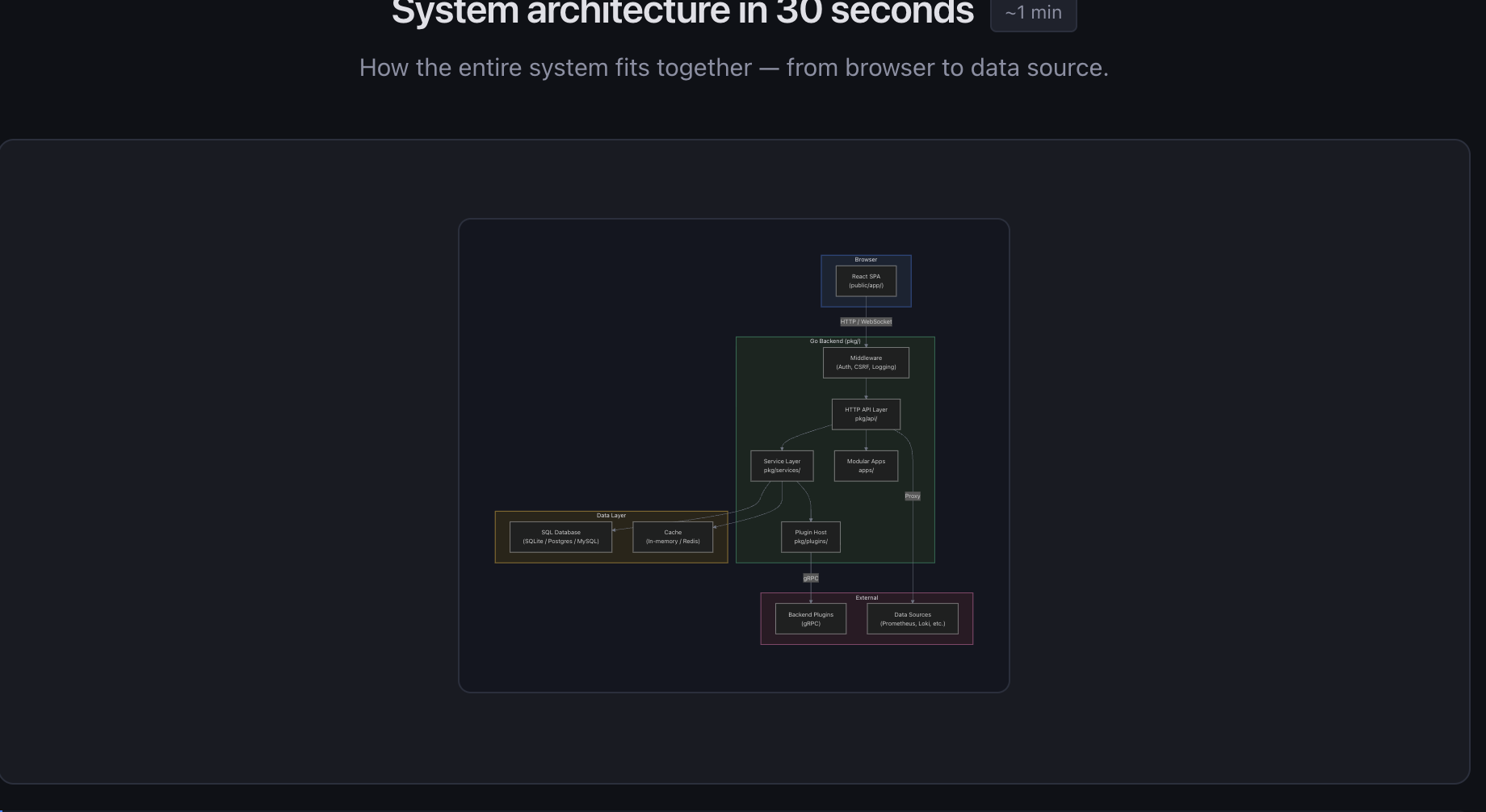
- A high-level architecture diagram showing how the browser, backend, database, and plugins connect
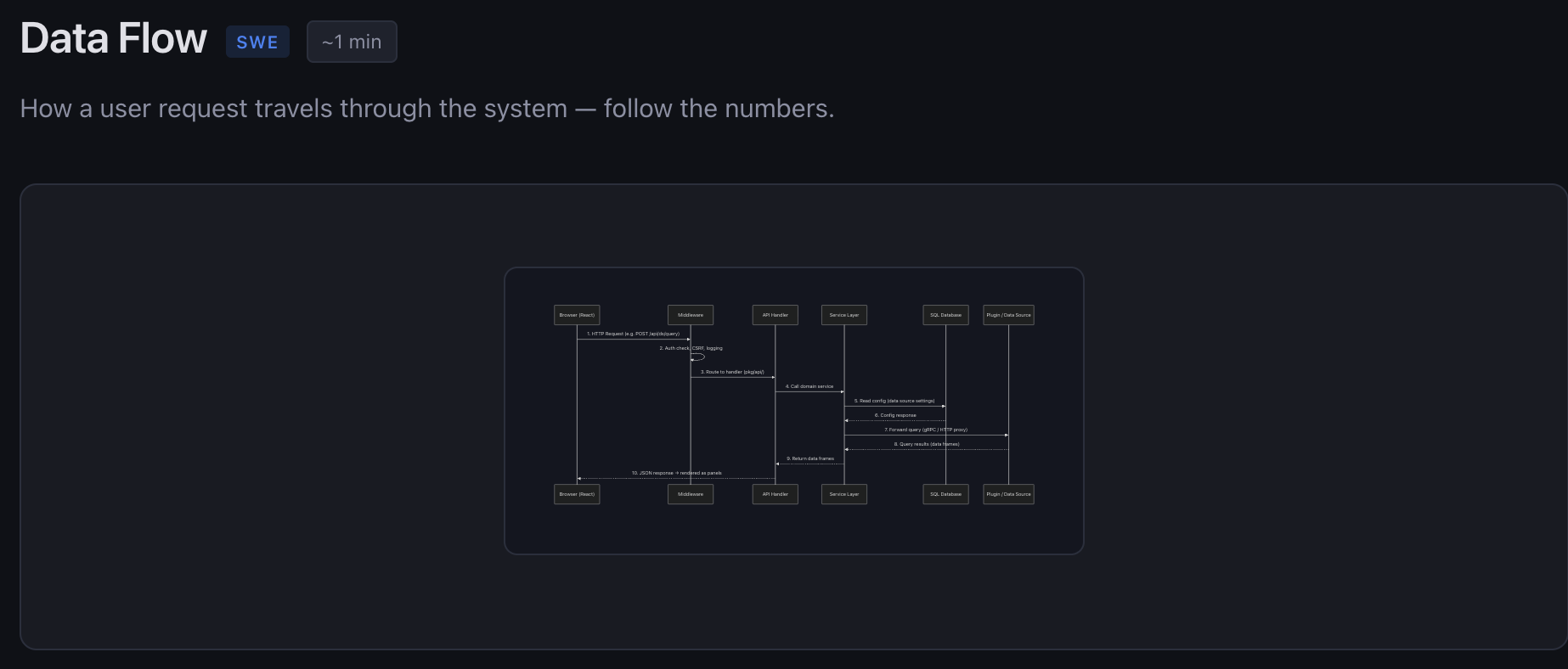
- A data flow sequence diagram tracing a request from the browser through middleware, API handlers, and service layer to external data sources
- Cards explaining each major component (HTTP API, service layer, plugin system, frontend SPA)
- A table of key directories with what lives in each one
- A list of the 10 most important files and what they do
- Step-by-step getting started instructions
- A command reference block with the most common dev commands
All generated from actually reading the codebase. Not hallucinated, not generic. It found the real entry points (pkg/cmd/grafana/main.go, public/app/index.ts), the real dependency injection setup (pkg/server/wire.go), and the real route definitions.

Making It Better
The first version was good but targeted at experienced engineers. I pushed it further by asking “what would make this useful for someone less experienced?”
That added:
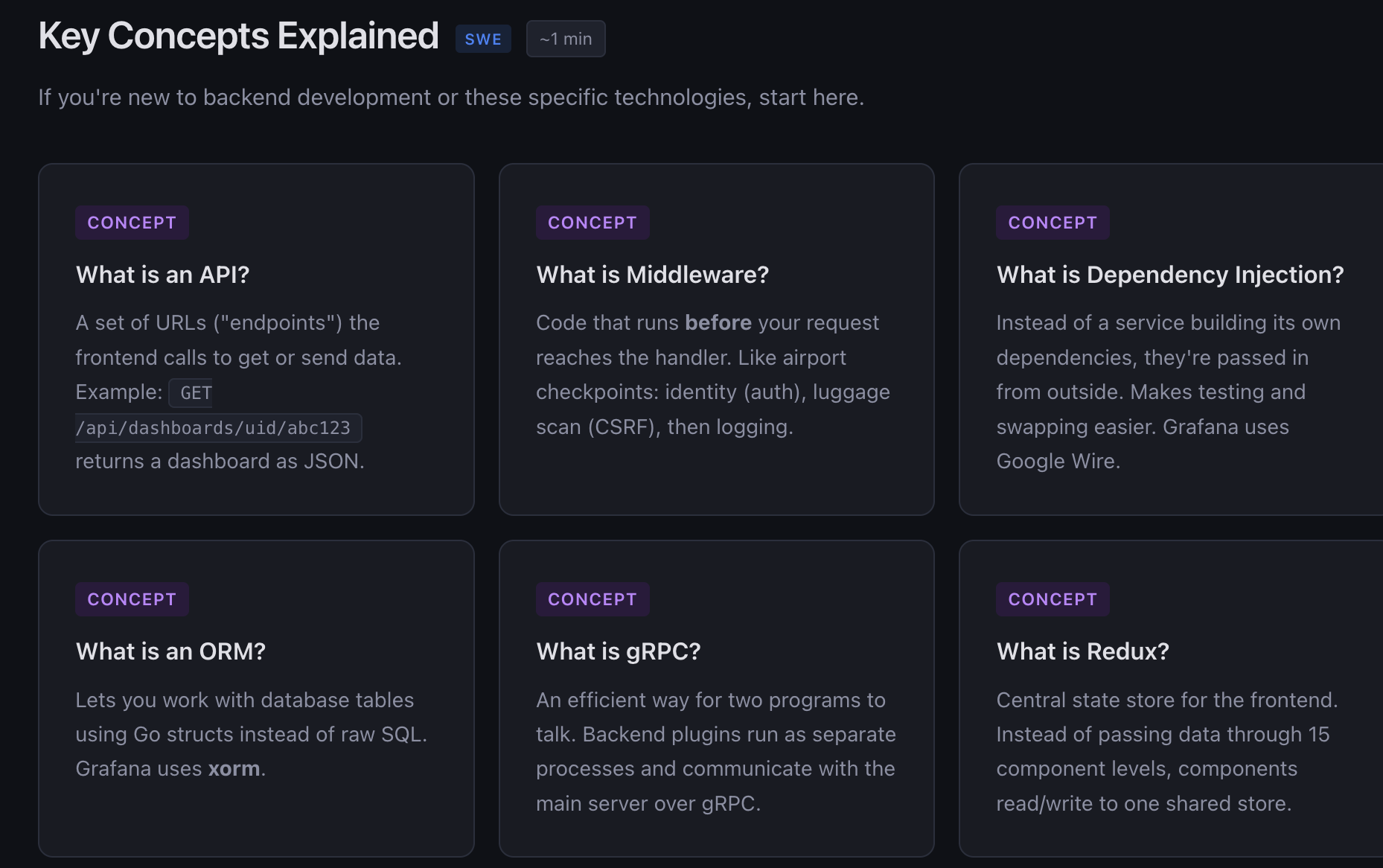
Concept explainers. Plain-English descriptions of things like dependency injection, middleware, ORMs, gRPC, and Redux. Each one uses analogies instead of jargon. Middleware becomes “security checkpoints at an airport.” Dependency injection becomes “instead of building your own database connection, someone hands you one.”
A mental model section. The most important paragraph on the whole page: “This repo has millions of lines of code. That is OK. You are not expected to understand all of it.” Then a simple apartment building analogy. Frontend is the apartment. Backend is the plumbing. Plugins are appliances.
A “Where Do I Look?” decision tree. Ten common tasks (“I want to change what a page looks like”, “I want to add an API endpoint”) mapped directly to the files you need to touch.
Common recipes. Step-by-step instructions for adding a backend endpoint, adding a frontend page, adding a feature toggle, and adding a database migration.
A debugging guide. A table mapping symptoms (backend won’t compile, API returns 500, blank page) to where to look and what to try.
Role-Based Views
Then I had another idea. Different roles care about different things. A software engineer needs to know how to build and debug. An engineering manager needs to understand team boundaries and PR patterns. A product manager needs to understand what features exist and how they ship.
So I added a role picker at the top of the page. Four tabs: Everyone, Software Engineer, Engineering Manager, Product Manager. Clicking one filters the entire page to show only relevant sections.
The implementation is pure CSS. Each section has a data-roles attribute, and the body class toggles visibility. No framework needed.
For EMs, it shows a service ownership map, what to look for in PRs (scope creep, migration risk, Wire changes), and deployment model notes.
For PMs, it shows core product areas (dashboards, explore, alerting), how features ship through feature flags, and where to find product context like routes, config, and user docs.
Each role also gets its own first-week checklist with practical tasks.
The Finishing Touches
A few more iterations added:
- Grouped dropdown navigation. The sticky nav went from 15+ flat links to 4 clean groups: Architecture, Understand, Build, Reference. Each expands on hover.
- Copy buttons on code blocks. One click to copy any command. Shows “Copied!” feedback.
- Back-to-top button. The page is long. A floating arrow appears after scrolling.
- Reading time badges. Each section header shows an estimated reading time calculated from word count.
- FAQ accordion. Nine questions every new hire asks: “Do I need Docker?”, “How do I reset my local DB?”, “How do I enable a feature flag?” Each expands to show the answer.
All of this is a single HTML file. No build step, no dependencies, no npm install. Open it in a browser and it works.
What the AI Got Right
The architecture analysis was surprisingly accurate. It correctly identified:
- The modular monolith pattern with services in
pkg/services/wired via Google Wire - The newer App SDK pattern in
apps/using Kubernetes-style APIs - Two query paths: built-in data sources via
pkg/tsdb/and external plugins via gRPC - The frontend boot sequence from
public/app/index.tsthroughinitApp.tstoapp.ts - Feature toggle management in
pkg/services/featuremgmt/ - The fact that frontend and backend deploy independently
It also correctly identified that yarn test runs in watch mode by default (a gotcha that trips up every new hire) and that the first build takes about 3 minutes.
What the AI Might Miss
This is important to be honest about.
Tribal knowledge. The AI can read code but it cannot capture unwritten team conventions, “why we did it this way” context, or which parts of the codebase are actively being rewritten.
Ownership accuracy. The team-to-directory mapping is inferred from code structure. Real ownership might differ.
Staleness. The codebase changes daily. File paths and patterns described in the guide might be outdated by the time someone reads it.
Oversimplification. Any diagram that fits on a screen is leaving things out. Service boundaries and internal APIs are more complex than what is shown.
I added an “AI Limitations” section to the page itself so readers know this upfront.
How to Do This for Your Project
The approach is not Grafana-specific. Here is how to replicate it:
1. Pick your tool. Claude Code, ChatGPT with file upload, Cursor, GitHub Copilot in the IDE. Anything that can read multiple files.
2. Give it context. Point it at the root of your repo. If using Claude Code, it reads the filesystem directly. If using ChatGPT, upload key files (README, main entry point, config, route definitions).
3. Be specific about output. Do not just say “explain this codebase.” Ask for a structured onboarding page with specific sections: architecture diagram, key folders, getting started steps, common recipes.
4. Iterate. The first pass will be decent but generic. Push it: “What would help a junior engineer?” “Add a debugging guide.” “Add role-based views.” Each round makes it significantly better.
5. Add honest limitations. Tell the AI to include a section about what it might have gotten wrong. This builds trust with readers.
6. Keep it maintainable. A single HTML file is easy to regenerate. When the codebase changes significantly, run the process again. It takes minutes, not days.
The Bigger Picture
The interesting thing here is not the specific output. It is the pattern.
Every company has onboarding docs that are either nonexistent, outdated, or written for someone who already understands the system. AI tools can now read an entire codebase and produce something useful in minutes.
This does not replace a good mentor or a well-maintained wiki. But it fills the gap between “here is the repo, good luck” and “here is a curated 20-page guide that took someone a week to write.”
The onboarding page I built for Grafana has architecture diagrams, concept explainers, role-based filtering, interactive FAQ, debugging guides, and step-by-step recipes. It took an afternoon of iterating with Claude Code. Doing this manually would have taken a week of reading code and writing docs.
That is the real value. Not replacing human knowledge, but generating a solid first draft that gets a new team member from zero to oriented in 30 minutes instead of 3 days.
Try It Yourself
If you want to try this on your own project, start with something like:
“You are a senior software architect creating an onboarding guide for a new engineer. Analyze this repository and generate a complete onboarding page with architecture diagrams, key folders, important files, getting started steps, and common gotchas.”
Then iterate from there. You will be surprised how good the first pass is, and how much better it gets with a few rounds of feedback.