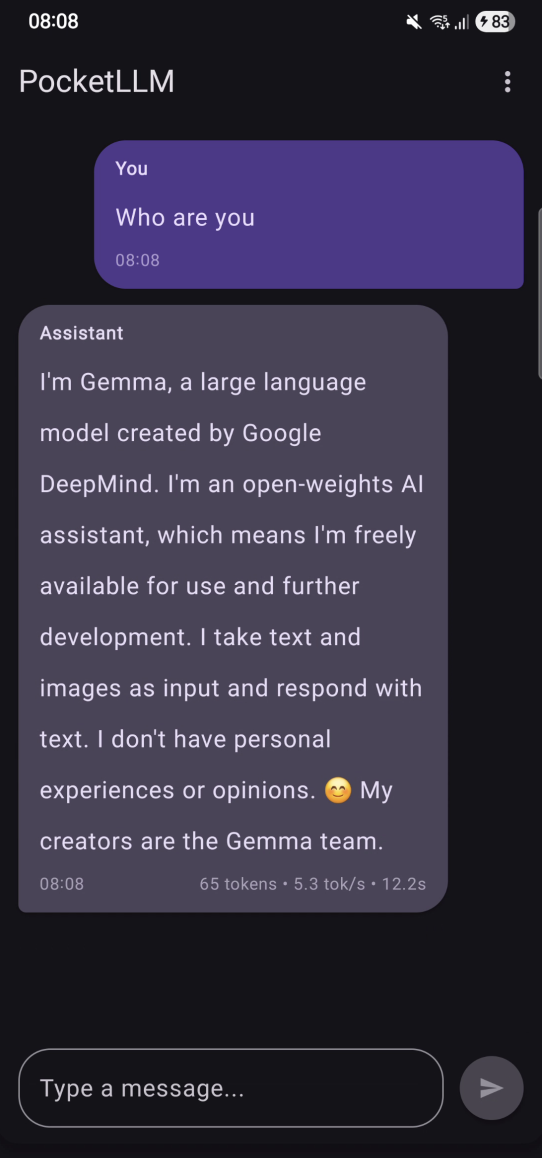
Your phone today is basically a tiny AI workstation. It can run a full language model offline, with zero cloud, and no data leaving your device. That was the whole point of PocketLLM, an Android app I built that runs Google’s Gemma 3n model locally using MediaPipe Tasks GenAI.
No servers. No API keys (except initial HuggingFace model download). No monthly bills. Just pure on-device intelligence.
Why I Wanted an On-Device LLM
I’ve been experimenting with running AI locally for a while, first on my MacBook, then on Android. Some reasons why you could want this:
- Prompts and code stay on your device.
- It works offline (flights, remote areas, anywhere).
- No rate limits, no API costs, no waiting on network calls.
When I learned Gemma 3n could be quantized to ~3GB and run on modern phones, it clicked:
“I can ship a full LLM inside an Android app.”
So I did. And it works.
Open LLMs Make This Possible
Models like:
- Meta Llama
- Google Gemma
- Mistral
…gave us something we didn’t have before: public weights that anyone can run.
Gemma 3n in particular is wild for its size. 3 billion parameters, quantized to ~3GB, runs smoothly on a flagship and “usable” on mid-range devices.
Real-World Use Cases
Here’s where on-device AI shines:
- Students → Study help without sending homework to cloud servers
- Developers → Code assistants that keep proprietary code local
- Medical professionals → Draft notes without risking patient data
- Lawyers → Generate documents without leaking client info
- Remote/offline workers → AI that works on a plane or in a tunnel
Basically: if privacy matters, or internet sucks, on-device AI wins.
How PocketLLM Is Built
PocketLLM uses MediaPipe Tasks GenAI to load and run Gemma 3n on Android. Architecture-wise, it’s clean and simple:
- Domain layer → business logic
- Data layer → MediaPipe integration + storage
- Presentation layer → Jetpack Compose UI
Add MediaPipe to Your Project
dependencies {
implementation("com.google.mediapipe:tasks-genai:0.10.27")
}
Requirements:
- Android API 26+
- ARM64 device
- Enough RAM (4GB+ recommended)
For secure key/model storage, you’ll want:
implementation("androidx.security:security-crypto:1.1.0-alpha06")
Core MediaPipe Integration
This is where the magic happens, inside ChatRepositoryImpl.
Initialize the model
llmInference = LlmInference.createFromOptions(
context,
LlmInference.LlmInferenceOptions.builder()
.setModelPath(modelPath)
.setMaxTokens(currentSettings.maxTokens)
.build()
)
Generate responses
session.addQueryChunk(prompt)
val response = session.generateResponse()
Customizable Model Behavior
Users can tweak how the model responds through settings:
- Temperature (0.0-1.0): Controls randomness.
- Lower = more focused,
- Higher = more creative
- Top K & Top P: Fine-tune token sampling
- Max Tokens: Control response length (128-2048)
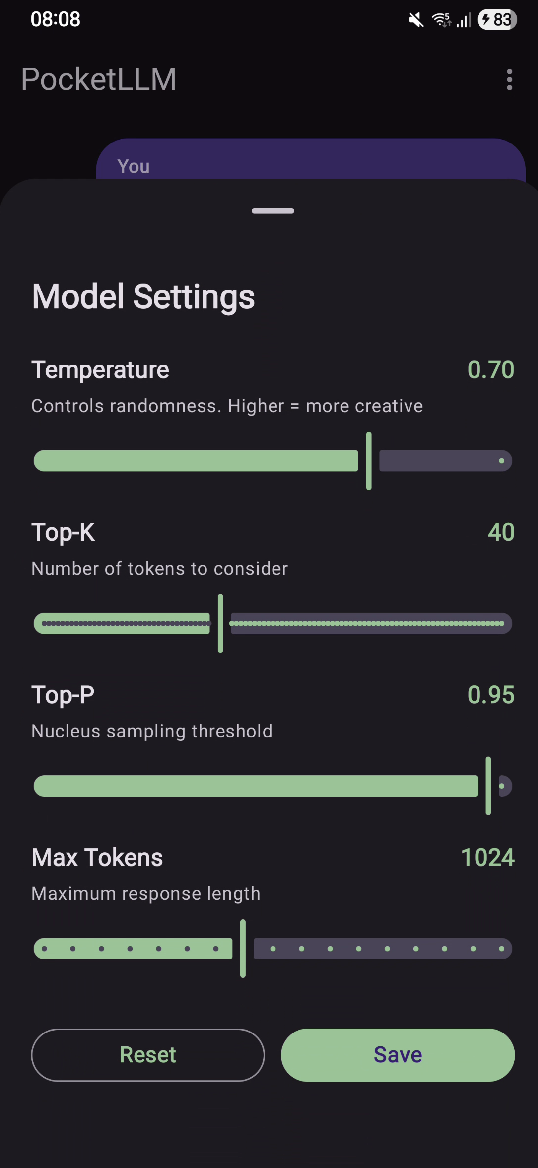
These are passed when creating the chat session, giving users control over the model’s personality.
Gemma 3n uses ~3GB of memory.
Model Downloads
WorkManager handles:
- downloading the model from HuggingFace
- progress updates
- error handling
- retries
Credentials get stored with EncryptedSharedPreferences.
Performance
Cold start: ~2-4 seconds depending on phone. After that, responses are snappy.
- Flagships: smooth
- Mid-range: usable
- Low-end: don’t bother, the model is too large.
What I Learned
- On-device LLMs are 100% usable today.
- MediaPipe GenAI has clean APIs and surprisingly good docs.
- Gemma 3n performs well for its size.
The future is clear: smaller models + better quantization = AI that lives on your device, not on the cloud.
Next steps for the project might include:
- streaming responses
- conversation memory
- multiple model support
…but honestly even v1 is already super functional.
Try It Yourself
Full source code is here: https://github.com/jafforgehq/pocketllm
If you care about privacy, offline AI, or you just want to build something cool with MediaPipe, give it a try. It’s clean, fully tested, and easy to extend.
This is the direction AI is moving, and it’s fun to be early.