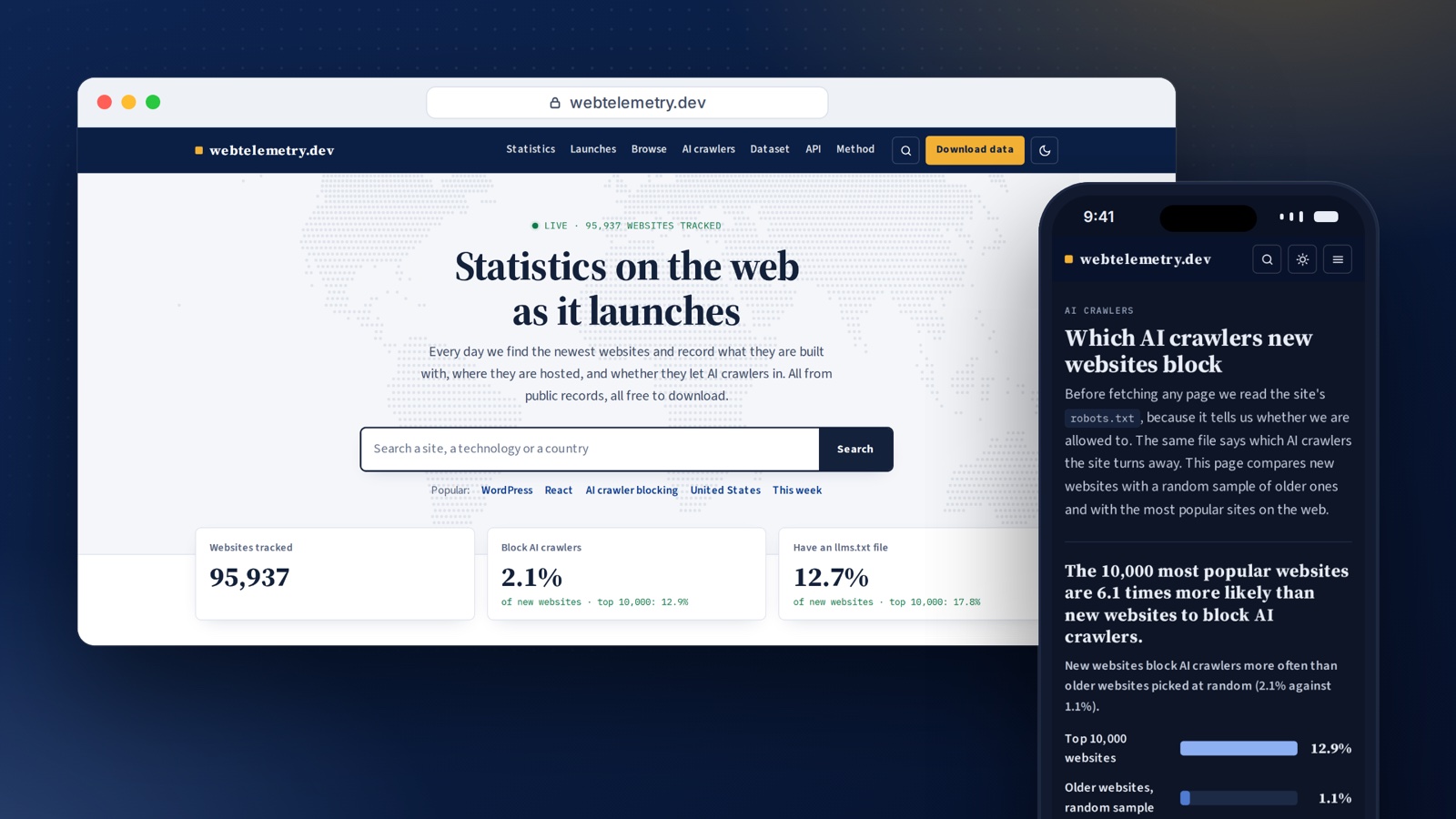
New websites go live every few seconds. Someone registers a domain, points it at a server, gets a certificate and publishes a first page. I wanted to see that happening: what people use to build new sites today, where they host them, and whether they let AI crawlers read them.
To be honest, the websites were only part of the reason. I mostly built this to learn how to process large amounts of data. I wanted to work with a stream of data that never stops, get real experience with tools like Kafka, and see what it takes to keep a pipeline running when millions of records come in every day. I also wanted to build a big database that I can use for my next projects. New websites turned out to be a great subject for that: the data is public, there is always more of it, and there are interesting questions to answer.
So I built webtelemetry.dev, with a lot of help from Claude. It is a live survey of new websites: it finds new sites in public certificate logs, checks with each domain’s registry that the domain is really new, visits the homepage once, and publishes what it finds: live statistics, a profile for every site, and a free dataset every day.
Visit webtelemetry.dev · Explore the project · Download the data
What it shows
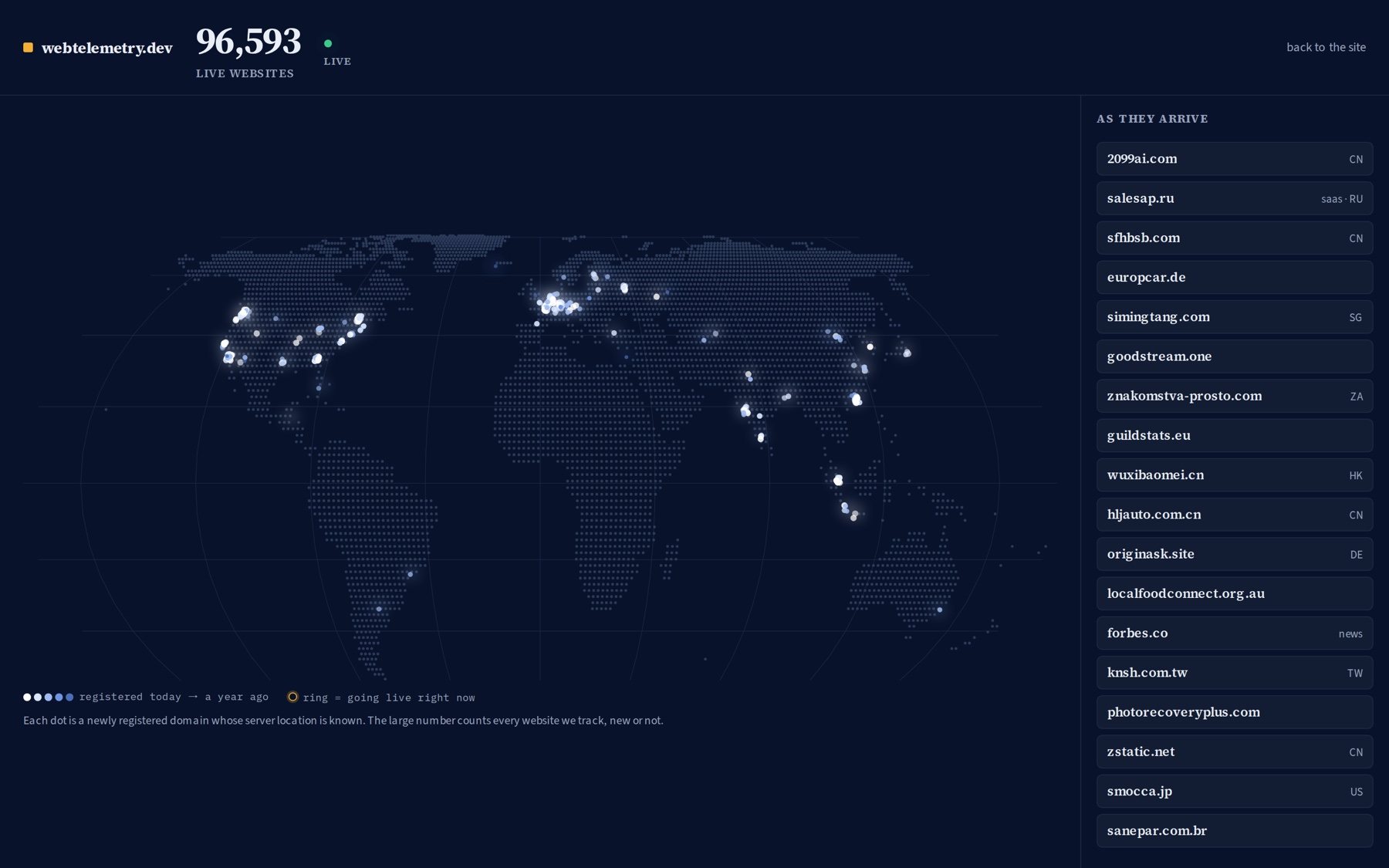
My favourite part is the live map. Every dot is a newly registered domain whose server location we know. Dots appear as soon as the crawler confirms the domain, and the newest sites are listed next to the map.
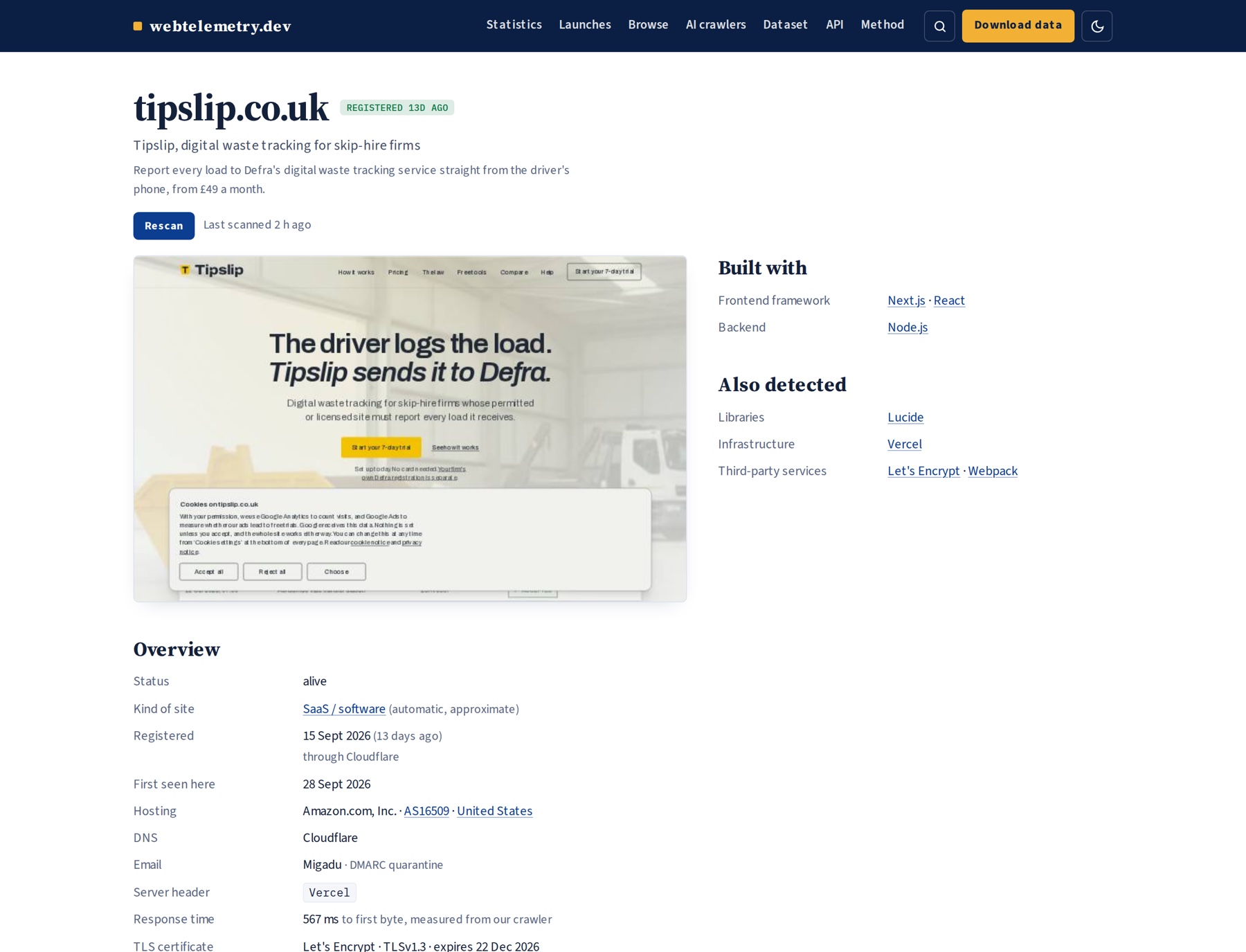
Every site gets its own profile: what it is built with, where it is hosted, who runs its DNS and email, when the domain was registered, how fast it responded and which AI crawlers it blocks. New sites that pass a basic quality check also get a screenshot of their homepage.
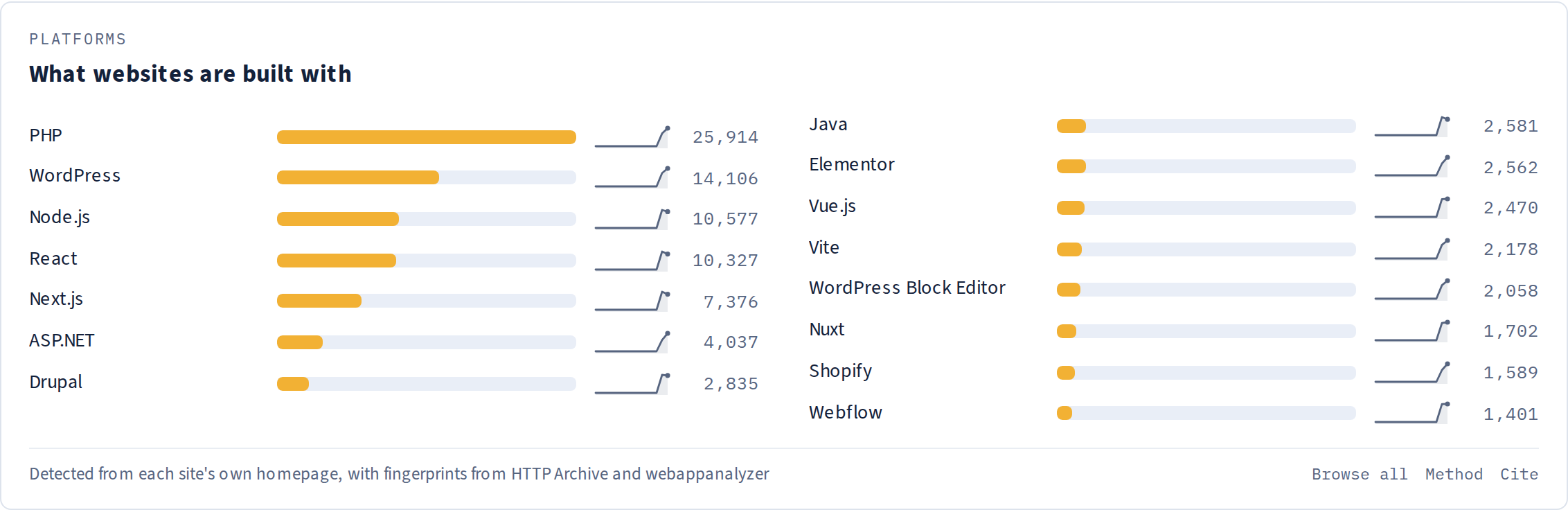
The statistics pages add all of this up: which platforms and frameworks new sites use, which countries and networks host them, who provides their DNS and email, and which certificate authorities and registrars they use. Every technology, country and type of site also has its own page.
Finding new websites when there is no list of new websites
There is no public list of “websites launched today”. But there is something close: Certificate Transparency. Every TLS certificate issued by a public authority is written to public logs that browsers require, and a new website almost always gets a certificate within minutes of going live.
There are two problems with that. First, most certificates are renewals for sites that have existed for years. Second, the logs are huge: the busiest ones get well over a hundred new entries every second. When I read them in order, the crawler was almost a day behind after its first week. So now it reads only the newest batch from each of 17 logs, run by five different companies, every 10 seconds. That still adds up to around 20 million certificates a day. It is a live sample, not a full copy, and when it falls behind it skips ahead to the newest entries instead of catching up. For this project, being late is worse than missing a few sites.
To separate new sites from renewals, every domain goes through a check first. The crawler asks the domain’s own registry, over RDAP (the modern replacement for WHOIS), when the domain was registered:
- domains registered in the last 30 days are visited first,
- domains up to a year old come next,
- and a random 2% of older domains are visited as a comparison sample.
Registries are shared infrastructure, so the crawler spaces out its requests to each one. Verisign, which runs .com and .net, gets at most one request per second, in line with its terms of use.
How the pipeline works
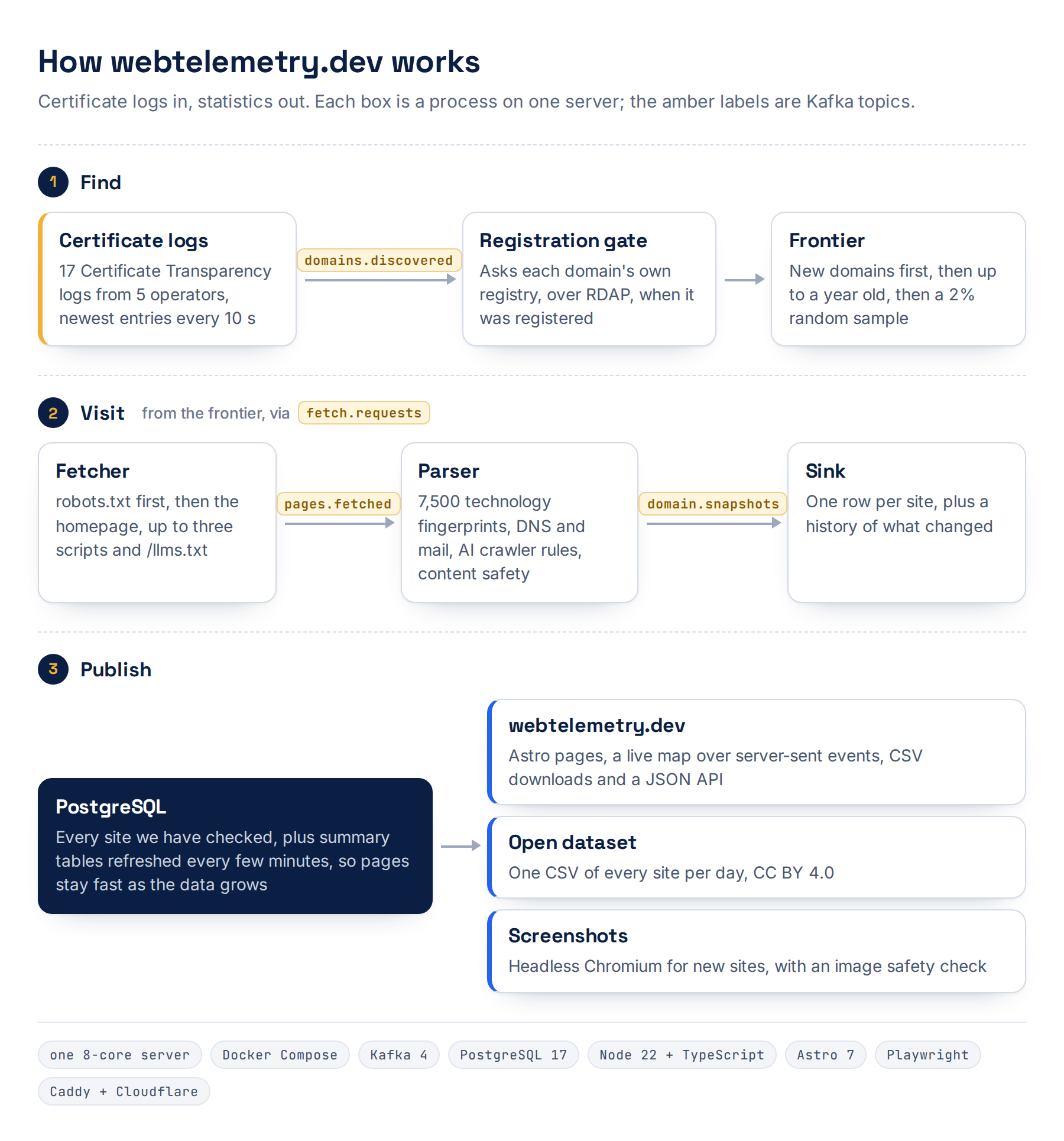
Everything runs on one server with 8 cores, using Docker Compose. The parts talk to each other through Kafka topics:
- Discovery reads the certificate logs and sends out candidate domains.
- The gate looks up registration dates and decides which domains are worth visiting.
- The scheduler hands out visits from a queue in Postgres. New domains always go first, before any revisits.
- The fetcher reads robots.txt first and respects it, then fetches the homepage,
up to three of the site’s own scripts and
/llms.txt. It waits at least two seconds between requests to the same host. - The parser turns the page into a profile.
- The sink saves one row per site, plus a history of what changed.
Using Kafka on a single server might look like overkill, but learning it was one of the reasons I started this project, and it has earned its place. When one part slows down, messages simply wait in Kafka instead of getting lost, and I can restart or scale any part without losing work. It also taught me a lesson the hard way: KafkaJS processes one message per partition at a time, so increasing the fetcher’s concurrency did nothing until the topic had enough partitions.
Turning a homepage into a profile
The parser checks each page against about 7,500 technology fingerprints from two open rule sets, both GPL-3.0 forks of Wappalyzer: HTTP Archive’s and enthec’s webappanalyzer. For about a hundred of the most important technologies I wrote my own rules, tuned against false positives I found. Around 6,600 technologies can be detected from a single visit to the homepage; the rest need a real browser.
Adding the second rule set taught me not to trust data blindly. Before turning it
on, I ran both rule sets over 1,869 real homepages and went through every new match
by hand. Ten rules were matching the wrong things. One would have marked every
Shopify store as using a JavaScript physics engine, because its pattern also matched
a Shopify theme file called rte-formatter.js. Another group looked for the
verification records that services like Slack or OpenAI ask domain owners to add,
and turned them into claims like “this site uses OpenAI”. I left those rules out,
and I run the same check before every update of the rule sets.
Besides technologies, each profile records the hosting network and country, DNS and email providers, SPF and DMARC, IPv6, the certificate issuer, a quality score and a guess at what type of site it is. Adult, drug, weapons, piracy and scam sites are removed completely. For that the crawler uses the page’s own text, Cloudflare’s family DNS filter and an image classifier that checks the screenshot.
AI crawlers and llms.txt
The crawler has to read robots.txt anyway, to know if it is allowed to visit. The same file also says which AI crawlers a site blocks, so every visit records the rules for fifteen of them, including GPTBot, ClaudeBot, CCBot, Google-Extended and PerplexityBot.
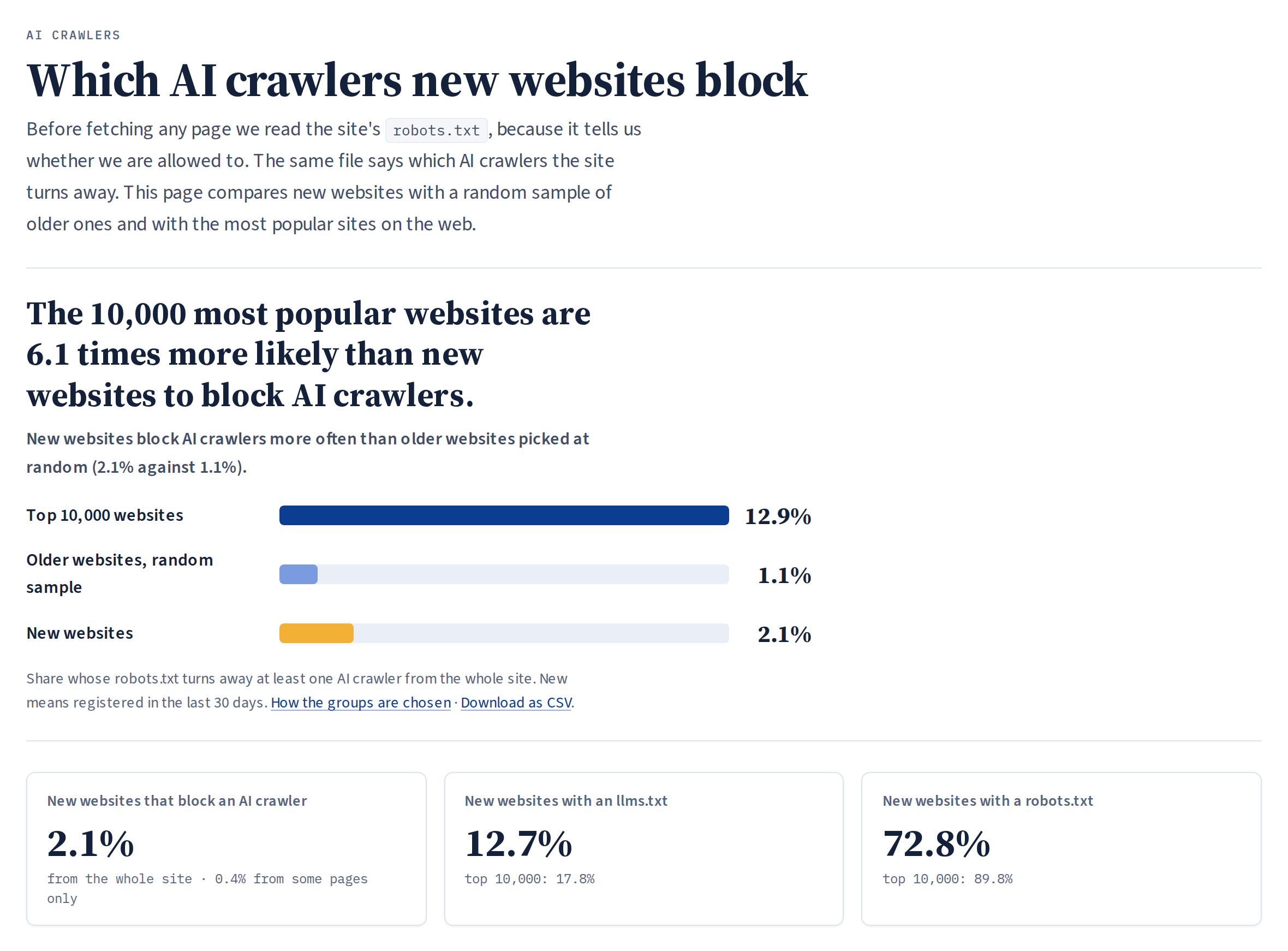
As of 28 September 2026, 12.9% of the 10,000 most popular websites block at least one AI crawler from the whole site, compared with 2.1% of new websites. So popular sites block AI crawlers about six times as often. The data is still young and the numbers change every day, but this gap has been there since the first hours.
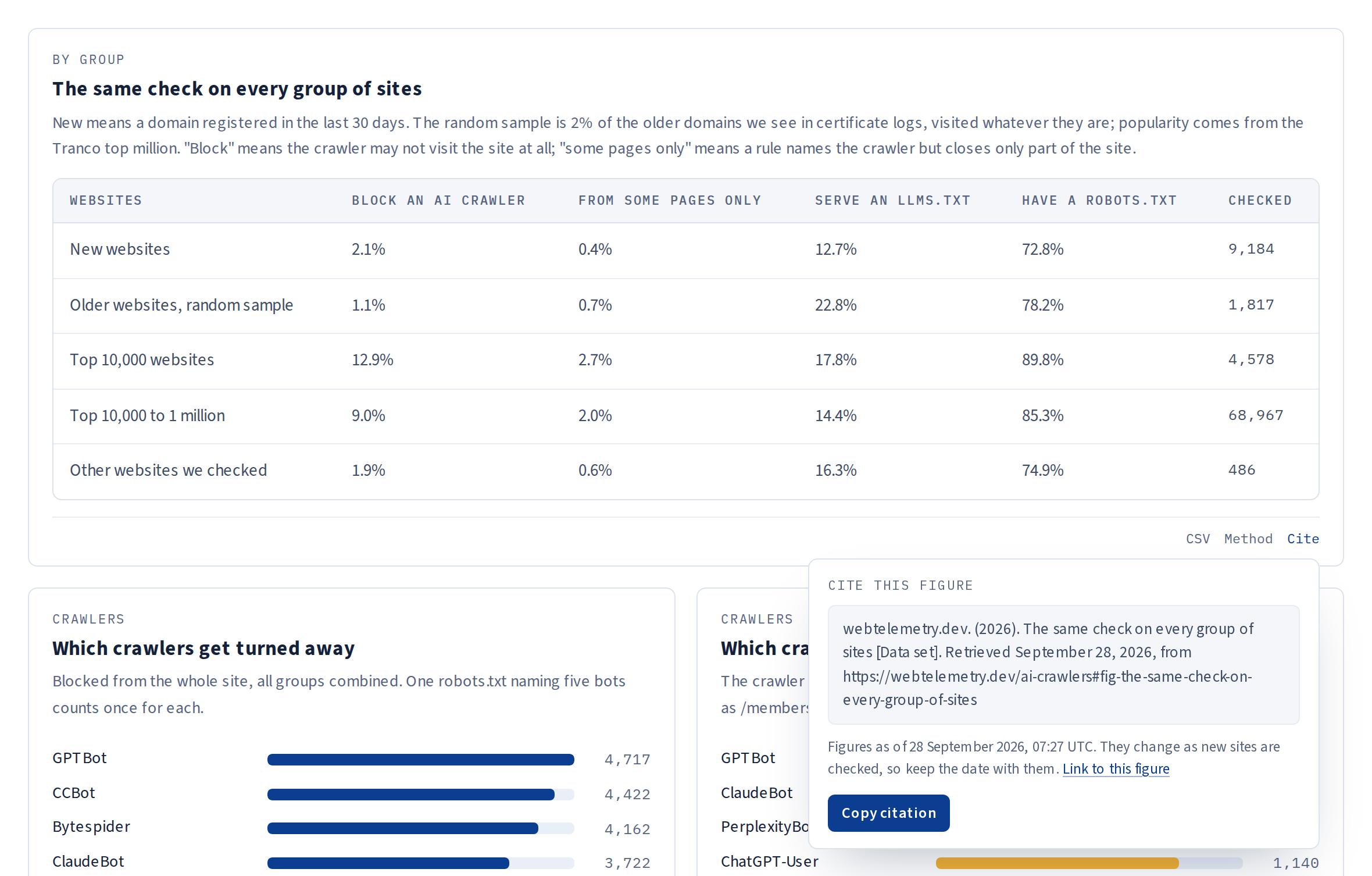
My first version of this comparison was wrong, and I think the mistake is worth sharing. I compared new sites with “all other sites”, and it turned out that most of those other sites came from the Tranco top million, which is a list of popular sites. When I compared new sites with a random sample of ordinary older sites instead, the big difference disappeared: the two are within about one percentage point of each other. The real difference was popularity, not age. Now every comparison uses clearly named groups (new sites, a random sample of older sites, the top 10,000 and the rest of the top million), and the site only reports a difference when a statistical test says it is unlikely to be chance. Blocking is also split in two: crawlers blocked from the whole site, and crawlers blocked from only some pages.
llms.txt is the opposite signal: a plain text file that tells language models what
a site is about and which pages matter. About one in eight new websites has one, but
many of those files were not written by the site owners at all.
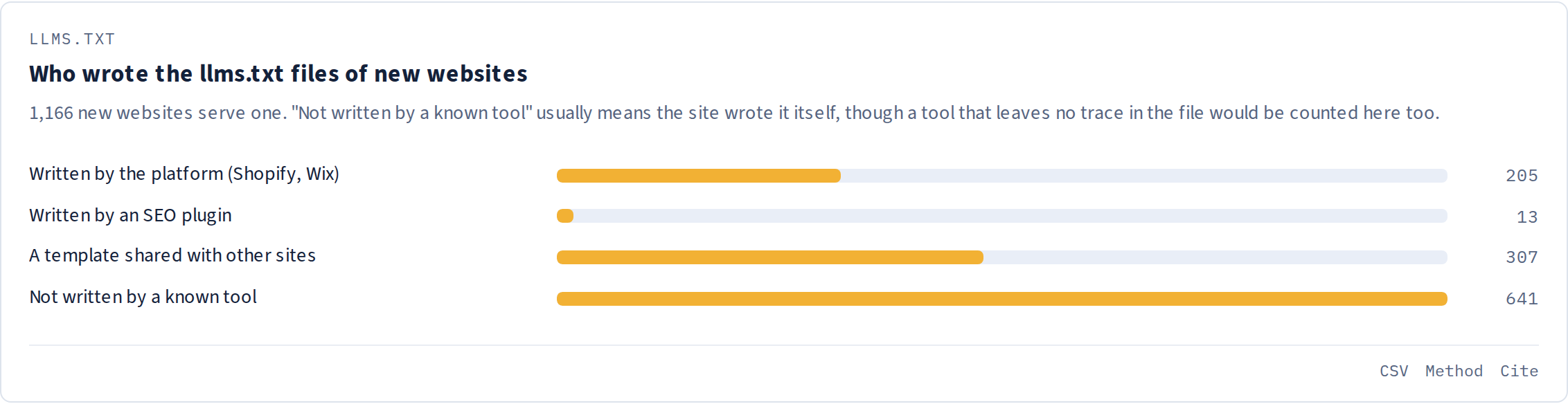
Shopify and Wix create one for every site on their platforms, SEO plugins generate them from a site’s pages, and parking pages all share the same template. The crawler recognises the lines these tools leave in their files: almost a fifth of the llms.txt files on new sites came from a platform or a plugin, and about a quarter are templates shared with other sites.
Fast, open and easy to cite
Every page reads from summary tables (materialized views that Postgres refreshes in the background every few minutes), so pages stay fast no matter how big the data gets. The frontend is built with Astro and rendered on the server, and the live counters and the map update in real time using server-sent events. There are no accounts and no advertising trackers, and the fonts are self-hosted.
All the data is meant to be reused:
- a daily CSV of every site, free under CC BY 4.0, with a snapshot kept every week;
- CSV downloads for the main charts, and a JSON API;
- a “Cite this” box on every chart, with the date of the figures.
Two more features will fill in as the data gets older. Every Monday, starting 5 October, 1,000 launches found one or two weeks earlier are checked against their registry again, and the results are published as a CSV. And the survival figures will show how many of each week’s launches are still working after one, four, eight and twelve weeks.
Running it on one server
The whole stack is Kafka 4, PostgreSQL 17, Node 22 with TypeScript, Astro 7 and a Playwright container for screenshots, behind Caddy and Cloudflare, on one server with 8 cores and 24 GB of RAM. A deploy script builds each service, runs a quick test and rolls back automatically if the new version does not start crawling. There are nightly backups, alerts and a small status bot on Telegram, and the admin panel is protected with a password and two-factor authentication.
Built with Claude
I did not build this alone. Claude helped me build most of it: I worked with it in Claude Code, where I described what I wanted and it wrote most of the code with me, from the certificate log reader and the Kafka pipeline to the website and the admin panel. It also did the full optimisation work, which is where I learned the most:
- moving every page onto summary tables once the database got big, so pages stay fast;
- tuning Kafka partitions and batching, and Postgres for the bigger server;
- the registration check, with a separate queue and rate limit for every registry;
- testing the second rule set on real homepages before switching it on;
- a deploy script that runs a smoke test and rolls back on its own.
My part was deciding what to build, testing it, and asking for changes whenever something did not look right.
What I learned
- Working with a lot of data is mostly about the boring parts. Summary tables, Kafka partitions, disk space and backups mattered more than any clever query. The hard part is keeping everything fast and reliable while the data keeps growing.
- For this project, fresh data beats complete data. Reading only the newest certificates tells you more about what is launching right now than reading everything and being a day behind.
- Check what you are comparing, not just the numbers. My first result about AI crawlers compared the wrong groups of sites. Now every group has a clear name, and every difference is tested before the site reports it.
- Test other people’s rules on your own data. Open rule sets are a gift, but ten of these rules would have quietly messed up my numbers.
- Be polite to shared infrastructure. Registries, certificate logs and the websites themselves are shared resources. Rate limits, respecting robots.txt and a clear page about the bot cost very little and keep the project welcome.
webtelemetry.dev is live and collecting data every minute. The numbers will get more reliable every week, and in early October the first seven-day average of launches and the first launch audit will appear. It is also turning into the big database I wanted for my next projects: every site it checks adds to a growing record of how the web is built. If you work with web data, the daily dataset is free to use.
Visit webtelemetry.dev · Explore the project · Download the data